
Quick Summary
Electric gate troubleshooting starts by identifying whether an unresponsive system is caused by power interruptions, sensor misalignments, or mechanical track resistance rather than immediate motor failure. Ironworks Gate Co. provides a structured diagnostic sequence to safely resolve everyday hardware issues while establishing when dangerous high-voltage faults, structural welding, or internal motor repairs require licensed technicians. By following this guide, readers can efficiently isolate operational errors and know when to call (747) 277-8422 for same-day emergency repairs or professional on-site assessments.
Electric Gate Troubleshooting: Fast Fixes & Pro Diagnostics
When an automated driveway gate stops responding, the instinct is often to blame the control board or assume the motor has burned out. In the field, however, most gate failures start as physical problems. Automated operators are built with sensitive safety circuits designed to cut power whenever they detect unexpected resistance. A hinge sagging under wind load, a track encrusted with hard-water mineral scale, or a misaligned safety eye will trip the motor’s current overload, leaving the gate motionless.[5]
Professional service, diagnostics, and repairs can vary in cost depending on whether an issue requires simple adjustments or replacement components. Before replacing parts or calling for professional service, you can run through a structured mechanical-first diagnostic sequence to isolate the issue safely. See also Automatic Gate Troubleshooting – Call Now-10% Off – Same-Day Service – Free Estimate.
Electric Gate Troubleshooting: Fast Diagnostics and Overview
Troubleshooting an automated gate works best when you work from mechanical movement inward toward the electronics. As technicians at Ironworks Gate Co. point out, starting with physical resistance prevents you from misinterpreting a safety-triggered motor stall as an electrical failure.[4]
- Check line power and breaker panels: Verify the main breaker has not tripped and the GFCI outlet at the gate operator is active.
- Inspect the photo-eye safety sensors: Look for steady alignment LEDs, clear away dirt, and brush off spider webs.
- Disengage the operator clutch: Test the physical gate by hand to see if it glides freely or binds along its path.
- Inspect control board status lights: Check the diagnostic LEDs on the logic board to see what fault codes the operator is reporting.
When to Call a Professional
Working around high-voltage controls, heavy steel leaves, and high-tension hardware carries real risks. A 2018 Consumer Product Safety Commission (CPSC) estimate reported approximately 300 emergency-room injuries per year associated with automatic gates between 2011 and 2015. An earlier 2001 CPSC publication reported more than 2,000 injuries and 32 fatalities.[2]
Derailments pose another severe risk. An ASTM study documented 47 work-related accidents in California from 1990 to 2024, with 35 injuries and 12 fatalities. If troubleshooting reveals cracked welds, bent structural posts, damaged high-voltage wiring, or failed physical end-stops, stop DIY work immediately and contact a licensed gate technician.
What You Need for Electric Gate Troubleshooting
Before opening the operator cabinet or testing manual movement, gather the basic tools and protective equipment needed to work safely around heavy machinery.
Diagnostic Tools
- Manual release key or pin: Unlocks the internal drive clutch so you can swing or slide the gate by hand.
- Digital multimeter (CAT III rated): Measures AC line voltage, secondary transformer output, and DC battery backup levels.
- Hand tools: Standard screwdrivers, a socket set, hex keys, and a clean microfiber rag for cleaning optical sensors.
- Dry silicone lubricant: Cleans and protects hinge pins and guide rollers without attracting grit.
- Manufacturer manual: Provides the specific diagnostic flash codes for your LiftMaster, DoorKing, Viking, or Nice Apollo unit.
Personal Safety Gear
Always put on heavy-duty leather work gloves, impact-resistant safety glasses, and steel-toe boots before handling gate leaves or reaching into mechanical enclosures. Automated gates apply lateral force that creates pinch and crush points along the track, hinge posts, and operator arms.
Step 1: Check Power Supplies, Breakers, and Motor Reset Switches
When a gate operator shows no signs of life, the problem is often an interrupted power circuit or an internal thermal safety shutdown.
Locating the Main Breaker and GFCI Outlet
Outdoor operators are exposed to morning condensation, sprinkler spray, and insects that can trip ground-fault circuits. Check your main home breaker panel for a tripped single-pole breaker feeding the driveway run. Next, open the weather-sealed disconnect box near the operator and verify that the GFCI receptacle reset button has not popped out. Use a non-contact voltage tester to confirm AC power reaches the control box before touching any internal terminals.
Testing the Thermal Overload Reset
When an electric motor pushes against heavy physical resistance on a hot afternoon, it draws high amperage that generates excess heat. This trips the motor’s built-in thermal overload switch to protect the internal windings from melting. If the operator feels hot or makes a faint hum without turning, let it cool down for 15 to 20 minutes. Press the red thermal reset button located on the side or bottom of the motor housing. If the unit runs on DC battery backup, test the battery levels with a multimeter; failing backup batteries can drag down the system logic even when AC power is present.
Step 2: Inspect and Realign Photo-Eye Safety Sensors
Need electric gate troubleshooting?
We’re available now - call for a fast, free estimate.
Under UL 325 safety standards, modern gate operators will not complete a closing cycle if the monitored safety circuit detects an obstruction or loses its optical link.
Cleaning Optical Lenses and Hoods
The safety sensors mounted near the bottom of your driveway posts are constantly exposed to dust, landscape clippings, and insects. Spider webs inside the sensor hoods or hard-water mineral spots on the reflective lenses can scatter the infrared beam. Wipe the sensor lenses clean with a damp microfiber cloth and ensure the protective hoods are clear of nests.
Checking Alignment LEDs
Every monitored photo-eye set has an indicator light on the receiving unit:
- A solid LED indicates the emitter and receiver are properly aligned and communicating.
- A blinking or dark LED means the beam is misaligned, blocked, or defective.
- To realign them, loosen the mounting bracket screws slightly and adjust the angle until the LED stays solid, then tighten the bracket firmly into place.
Step 3: Test Remote Transmitters, Keypads, and Loop Detectors
If the gate will not respond to a clicker, you need to isolate whether the issue lies in the wireless transmission or the gate’s logic board.
Bypassing Wireless Accessories
Locate the manual test button on the operator control board (often labeled Single-Button Station, Cycle, or Open). Press this button directly. If the gate runs a complete cycle, your motor, limit switches, and primary logic board are working fine. The issue is isolated to your wireless accessories, such as dead remote batteries, radio frequency interference, or a damaged external antenna wire.
Diagnosing Underground Loop Detectors
Driveway safety and exit loops use wire coils embedded in the asphalt or concrete. Over time, ground shifting or water seepage through cracked sealant can damage the loop insulation. Check the plug-in loop detector module inside the operator cabinet. If the detection LED stays lit red when no vehicle is present, the module is locked in a false detection state, which holds the gate continuously open. Try adjusting the sensitivity dial down. If the light stays on, the loop wire itself may need testing or replacement.
Step 4: Disengage the Clutch to Test Mechanical Track and Hinge Resistance
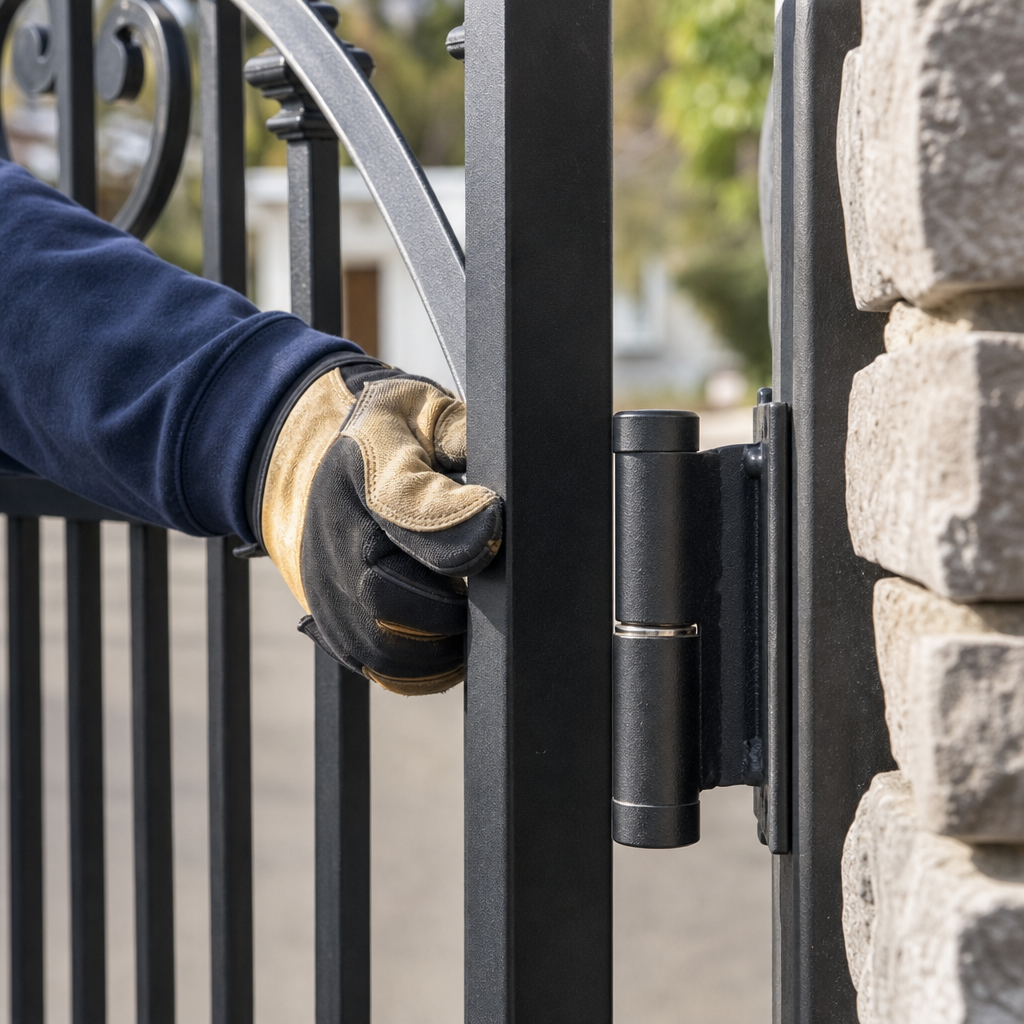
This is the most informative step in gate troubleshooting. By disconnecting the motor from the gate leaf, you can feel exactly what the motor is fighting against during normal operation.
Manual Free-Wheel Testing
Insert your manual release key into the operator lock, turn the handle, or pull the disconnect pin (depending on the model). Once disengaged, push the gate through its entire opening and closing stroke by hand. According to Ironworks Gate Co., a well-installed residential gate should move smoothly with light, single-handed effort.
- Sliding gates: Feel for flat spots on the ground rollers, bent track sections, or grinding sounds caused by gravel packed into the V-groove.
- Swing gates: Check for sticking hinge bearings, sagging posts, or swing arms binding against the driveway slope.
Environmental Resistance and Track Binding
Gates installed in areas with strong seasonal winds experience heavy lateral loads that can bend hinge barrels out of plumb over time. In addition, hard mineral water from landscape sprinklers leaves thick calcium deposits on ground tracks, adding steady friction. If you have to lean your full body weight into the gate to get it moving, the operator’s safety amp-limiter is simply doing its job by refusing to run.[3]
Step 5: Inspect Operator Gears, Drive Chains, and Limit Switches
If the gate moves smoothly by hand, inspect the drive components that transfer power from the gearbox to the gate leaf.
Chain Deflection and Sprocket Condition
On slide gate operators, check the drive chain tension. A properly tensioned chain should have appropriate vertical sag along its span without being overly loose. If the chain is too loose, it will slap against the chassis and jump teeth on the drive sprocket. Look closely at the teeth on the drive sprocket; if they look curved or hooked like shark fins, the sprocket is worn and slipping under load.
Limit Switches and Physical Travel Stops
Limit switches tell the motor when the gate has reached the fully open or fully closed position. Loose mounting nuts, vibration, or dirt can cause limit cams to slip. When limits fail to trigger, the gate can slam into stops or overrun its track.
A past U.S. OSHA accident report detailed a serious injury where a maintenance worker was hurt when an electrically operated gate failed at its limit switch, ran off the track, and fell. Ensure limit switches click cleanly when triggered, keep their contact points clean, and confirm that heavy-duty physical positive stops are welded at both ends of the track to prevent the gate from ever leaving its channel.[1]
Step 6: Reset the Gate Operator and Reprogram Travel Limits
Need electric gate troubleshooting?
We’re available now - call for a fast, free estimate.
Modern microprocessor-driven gate operators monitor the electrical current drawn by the motor during every cycle. If the board registers a sudden spike in current, it enters a safety lockout mode that requires a reset.
Performing a Control Board Reset
- Turn off the main AC power breaker and disconnect the backup batteries for 60 seconds to clear residual capacitor voltage.
- Reconnect the batteries and restore main power.
- Locate the “Reset” button on the logic board and hold it down until the diagnostic LEDs clear.
- Inspect the board for visible damage, such as swollen capacitors, scorched traces, or insect contamination across the back of the circuit board.
Reprogramming Travel and Force Thresholds
After a hard reset, many operators must run an auto-learn cycle to map their travel distance and force curves:
- Use the onboard jog buttons to set the exact open and closed limit positions according to the manufacturer’s manual.
- Initiate the automatic force-learning routine. The board will cycle the gate to calculate baseline dynamic amp draw.
- Verify that the photo-eye sensors remain fully unobstructed while the board maps its operational travel limits.
Top Gate Opener Brands and Diagnostic Checks
While the mechanical fundamentals apply across all gates, different operator brands use distinct diagnostic interfaces.
LiftMaster and Chamberlain Openers
Modern DC-powered LiftMaster units feature built-in diagnostic LED screens or flashing indicator lights. Fault codes flash in specific sequences to indicate optical safety sensor faults, limit switch errors, or battery issues. Consulting the manufacturer manual helps decode these flashes directly.
DoorKing (DKS) Operators
DoorKing slide and swing operators rely on mechanical limit switches and modular loop detectors. The control boards feature clear status LEDs next to terminal inputs. If the “Loop” or “Safety” LED stays continuously illuminated when the driveway is clear, that specific accessory circuit is holding the relay open.
Viking Access and Nice Apollo Actuators
Viking and Nice Apollo operators feature diagnostic boards and readouts to monitor battery voltage and motor load. Linear swing actuators also rely on proper maintenance at pivot points to prevent mechanical binding that the control board could interpret as an obstruction.
What Does Electric Gate Troubleshooting and Repair Cost?
As the team at Ironworks Gate Co. emphasizes, most gate problems do not require replacing the entire motorized unit. Getting an accurate diagnosis upfront helps ensure you only pay to repair or replace the component that actually failed.
| Service Type | Cost Overview | Common Issues Addressed | Work Performed |
|---|---|---|---|
| Diagnostic Service Call | Standard diagnostic labor rates vary by region and provider | System unresponsive, remote failure, unknown fault | Electrical testing, manual release check, safety circuit testing |
| Standard Component Repair | Cost varies based on specific parts required | Misaligned photo-eyes, dead backup batteries, worn drive chain, limit switch failure | Sensor replacement, chain tensioning, limit reset, hinge lubrication |
| Full Operator Replacement | Higher cost dependent on motor size, hardware, and gate type | Burned gearbox, cracked chassis, obsolete board with no replacement parts | New motor installation, logic board setup, safety sensor wiring, full system calibration |
Frequently Asked Questions About Electric Gate Troubleshooting
Why is my electric gate not opening with the remote?
An unresponsive remote is usually caused by dead transmitter batteries, radio frequency interference from nearby electronics, a damaged antenna wire on the operator box, or an activated safety loop holding the system closed. Check the onboard cycle button first to confirm the motor and receiver board are still receiving power.
How do I manually open an automatic gate when the power is out?
Insert your manual release key into the operator cam lock, turn it to disengage the clutch, or pull the emergency disconnect pin located on the swing arm or chain bracket. Once disengaged, you can slide or swing the gate open smoothly by hand without damaging the drive gears.
Why does my electric gate start to close and then reopen?
This symptom almost always points to a triggered safety sensor or an amp-overload threshold. If the photo-eye sensors lose alignment or detect dirt across the lens as the gate moves, the operator immediately reverses to prevent damage. Heavy hinge friction or a high spot on the ground track can also trigger the same safety reversal.
How do you reset an electric gate opener motor?
Turn off the main electrical breaker and disconnect the backup batteries for 60 seconds to completely discharge the control board. Restore power, locate the “Reset” or “Learn” button on the logic board, and press it to clear error locks. Then run a complete manual cycle so the motor can recalibrate its travel limits and force curves.
How do I know if my gate safety sensors are misaligned or broken?
Check the indicator LEDs on both the transmitting and receiving sensor modules mounted near the base of your posts. If the receiving sensor LED is blinking, red, or completely dark, the sensors are misaligned, dirty, or missing power. A solid green or amber LED indicates a clean, unbroken optical link.
When should I call a professional for automatic gate repair?
Call a licensed gate technician if the gate is sagging severely, the ground track has pulled out of the concrete, high-voltage power wires are damaged, or the internal gearbox is grinding metal. Any issue involving structural welding or gate leaves falling off their tracks requires professional handling to ensure safe operation.
Need electric gate troubleshooting?
We’re available now - call for a fast, free estimate.
Sources
- Accident Search Results | Occupational Safety and Health … – osha.gov (2026)
- [PDF] 2015 Annual Report – Consumer Product Safety Commission – cpsc.gov (2015)
- New Safety Standard for Automatic Security Gates Helps … – cpsc.gov (2000)
- Illinois High-Speed Rail Four-Quadrant Gate Reliability … – railroads.dot.gov (2009)
- North American Joint Positive Train Control System Four … – railroads.dot.gov
Related reading: Automatic Driveway Gate Repair – Call Now-10% Off – On-Site in 60 Minutes – Free Estimate
Related reading: Electric Gate Problems – Call Now-10% Off – Same-Day Service – Free Estimate
Related reading: How to Open Electric Gate Manually | Call Now-10% Off | Same-Day Service | Free Estimate
Frequently Asked Questions
Why does my electric gate motor hum and trip the thermal reset button repeatedly?
A motor that hums without moving typically suffers from severe physical resistance, such as sagging hinge posts, bound ground rollers, or a failing internal capacitor. Continuing to force the motor to run can scorch the internal windings, so disengage the clutch to check if the leaf moves smoothly by hand. If the gate binds mechanically or the motor continues humming while disconnected, contact Ironworks Gate Co. at (747) 277-8422 for professional motor diagnostics.
How do I know if a faulty underground loop detector is keeping my gate stuck open?
Open the operator housing and check the plug-in loop detector module to see if the detection LED remains illuminated red when no vehicle is above the coil. You can lower the module's sensitivity dial to clear false triggers caused by ground shifting or moisture intrusion in cracked asphalt sealant. If the LED stays locked on after reducing sensitivity, the underground loop wire is damaged and requires professional testing or replacement.
What should I do if my sliding gate derails or the ground track pulls out of the concrete?
Turn off the main electrical breaker immediately to stop the motor from driving the derailed gate, which creates severe tipping and crush risks. Do not attempt DIY structural welding or track anchoring on heavy steel assemblies without certified equipment and safety supports. Call Ironworks Gate Co. for same-day emergency dispatch to safely re-anchor the track, realign the rollers, and verify physical positive end-stops.
About the author
 |
Sarah Miller Sarah is a seasoned technical writer with over 8 years of experience in the home services industry, specifically focusing on automated gate systems and property access control. She holds a B.A. in Communications from California State University, Fullerton, and works closely with licensed technicians to translate complex mechanical and electrical repair processes into accessible, transparent guides for homeowners and property managers. Her expertise lies in breaking down gate repair costs and maintenance best practices for Southern California residents. |
Gate not opening, off track, or opener dead?
We’re available now - call for a fast, free estimate.
Call Now - Free Estimate